
August 19, 2026
DyskStream — YouTube Live Points & OBS Alerts.
Frontend · BackendA YouTube Live bot that reads live chat, awards points to commenters, and turns them into Saweria-style OBS alerts.
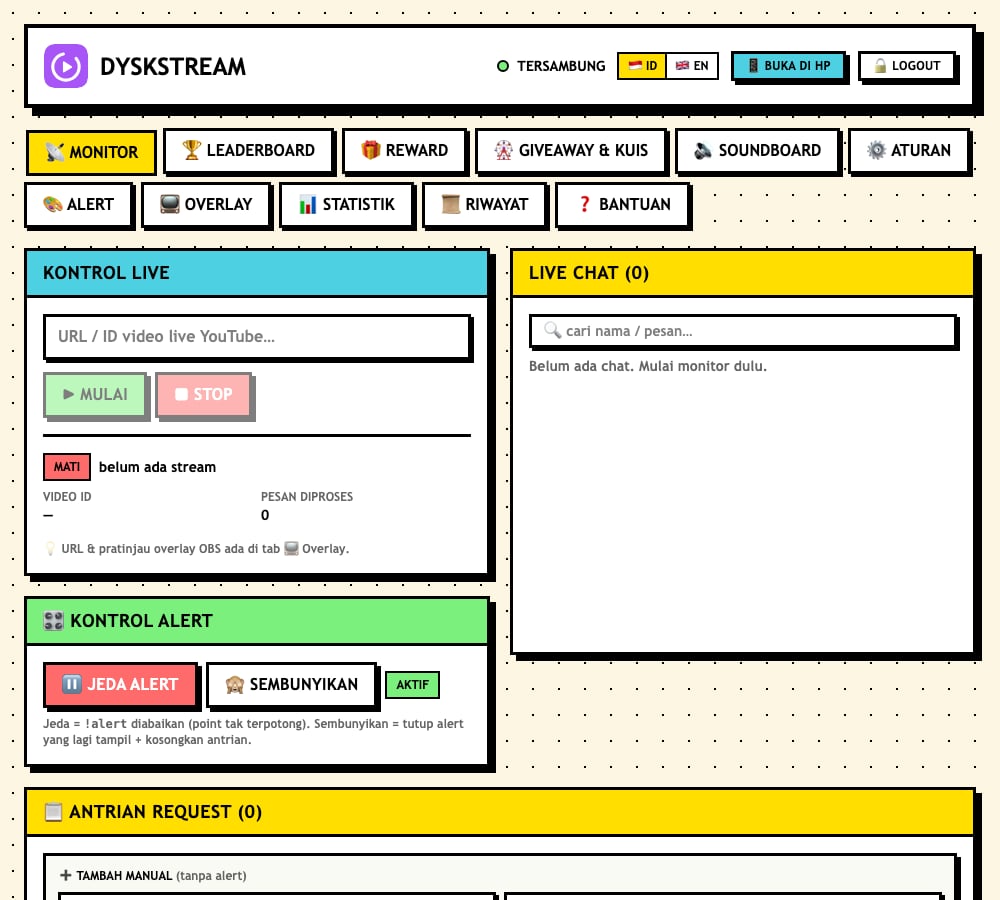

Description
DyskStream is a bot for YouTube Live that reads the live chat of any public channel, awards a point to each viewer who comments, and lets viewers spend those points on Saweria-style alerts shown in OBS via a !alert <message> command. It reads chat without any login or OAuth
by using masterchat, so it only needs the live video URL or ID.
General reply commands and chat moderation are intentionally left to Nightbot, keeping the bot itself focused on reading chat, tracking points, and driving overlays.
DyskStream was called Streaming Assistant before it joined DyskLab , my open-source label.
Background
Point-and-alert engagement is popular on live streams, but most tooling either requires a paid service or full API access to the channel. I wanted a self-hosted alternative that could read chat from any public live stream without API keys or quota, and that could be run 24/7 on a small server.
Goal
Build a self-hostable engagement system that reads YouTube live chat without OAuth, maintains a configurable point economy, and renders donation-style alerts and overlays in OBS, all controllable from a single password-protected dashboard.
Features
- Reads the live chat of any public channel with no API key and no quota.
- Point system that awards points per comment (with a cooldown), command bonuses, and a leaderboard.
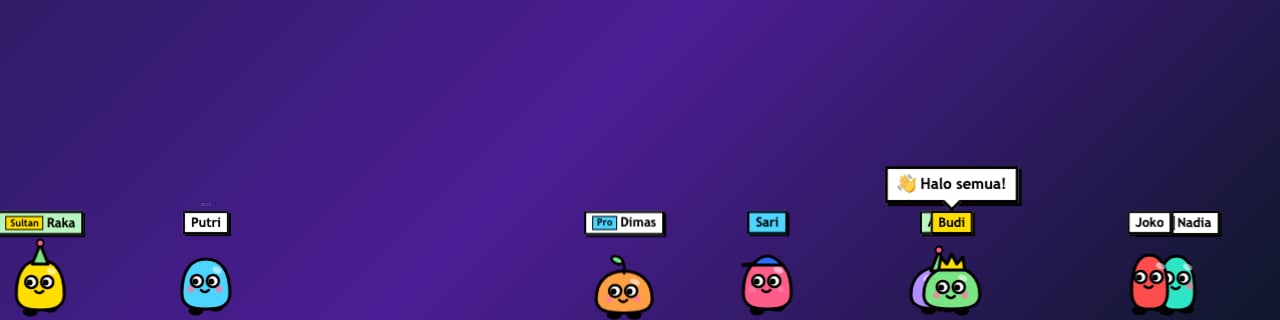
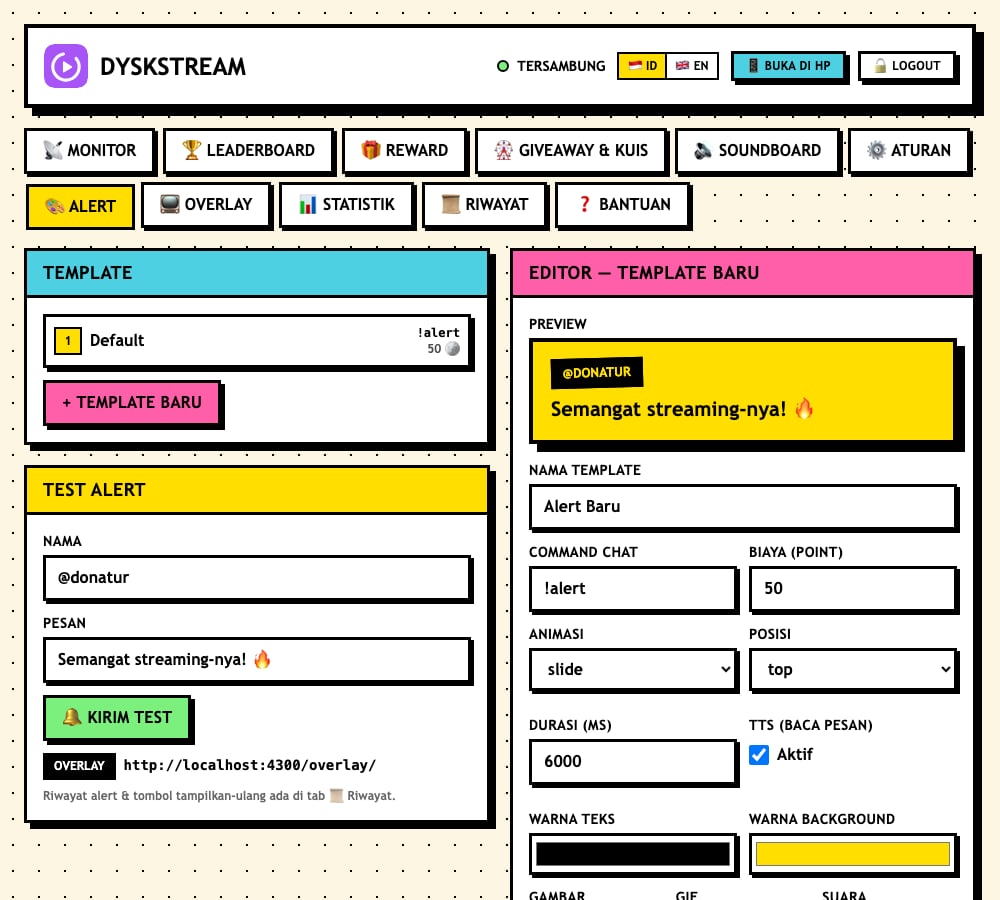
!alert <message>command that deducts points and shows an alert in OBS with custom image, sound, and TTS, queued one at a time so alerts never stack.- OBS overlays for alerts, live chat, the leaderboard, an event ticker, a request queue, running text, a goal bar, and viewer avatars (blob and blocky characters that walk, jump, and duel on chat commands).
- Full-screen scenes for starting soon, be right back, and stream ended.
- Rewards, a giveaway, and chat trivia, plus a soundboard with hotkeys.
- Dashboard for monitoring, the leaderboard, all rules, and alert templates with a Test Alert button, in Indonesian or English.
- Sign in to the dashboard from a phone by scanning a QR code.
- Nightbot integration exposing
!point/!rankreplies through$(urlfetch)endpoints, since the bot does not post to chat. - A public leaderboard page to share with viewers.
- An Electron desktop app for macOS and Windows that runs the server and dashboard in one window with a tray icon.
Technologies
- Fastify
backend on Node.js 25+ (uses the built-in
node:sqlitemodule) written in TypeScript masterchatfor reading live chat without login- SQLite for persistence, plus WebSocket for pushing alerts and updates to overlays
- React + Vite + Tailwind CSS dashboard (neobrutalist style)
- Electron for the desktop app, with the server bundled by esbuild
- Zod for validation; Docker Compose and PM2 for deployment
How to Run
The easiest way is the desktop app: cd desktop && npm install && npm run dist:mac (or dist:win) builds an installer. In development, run two processes: cd server && npm install && npm run dev starts the backend at http://localhost:4300, and cd dashboard && npm install && npm run dev starts the dashboard at http://localhost:4301. For production, everything runs on a single port (4300): build the dashboard, and the server serves the built assets directly. This can be deployed with Docker Compose (docker compose up -d --build) or with PM2 (pm2 start ecosystem.config.cjs). A tunnel such as cloudflared
or ngrok can expose the local server publicly for Nightbot and remote viewers.
Technical Decisions
The chat reader sits behind a ChatReader interface so the unofficial masterchat backend can be swapped for the official YouTube Data API (with a key and quota) if needed. Persistence uses Node’s built-in node:sqlite, avoiding a native SQLite dependency at the cost of requiring a recent Node version. Because the bot deliberately does not post to chat, reply commands are delegated to Nightbot via simple $(urlfetch) endpoints. Admin endpoints require a bearer token persisted in SQLite, and the phone login uses a single-use code that expires after two minutes.
What I Learned
Working with an unofficial chat reader taught me to design around fragility, isolating it behind an interface so a single upstream change would not require rewriting the app. I also learned practical details of running a self-hosted service 24/7, from persisting session tokens across restarts to serving a built SPA from the same port as the API. An early version had Google login for viewers, which taught me the real-world constraints of Google’s sensitive OAuth scopes; the current version no longer has it.
Notes
The repository is public. A key caveat is that masterchat is unofficial and may break if YouTube changes its internal chat format, though the reader can be swapped to the official API.
Read the story behind this project: Streaming Assistant (in Indonesian, written before the rename).

Hey! I’m Fanny, the software engineer tending to this digital garden. You can read more about me, or subscribe by email.