
September 24, 2026
Mac Service Admin.
Backend · Frontend · DevOpsA local, dependency-free web dashboard for managing a macOS dev environment — Homebrew services, Docker, Laravel Herd, language versions, config files, system stats, and a real terminal in the browser.
Description
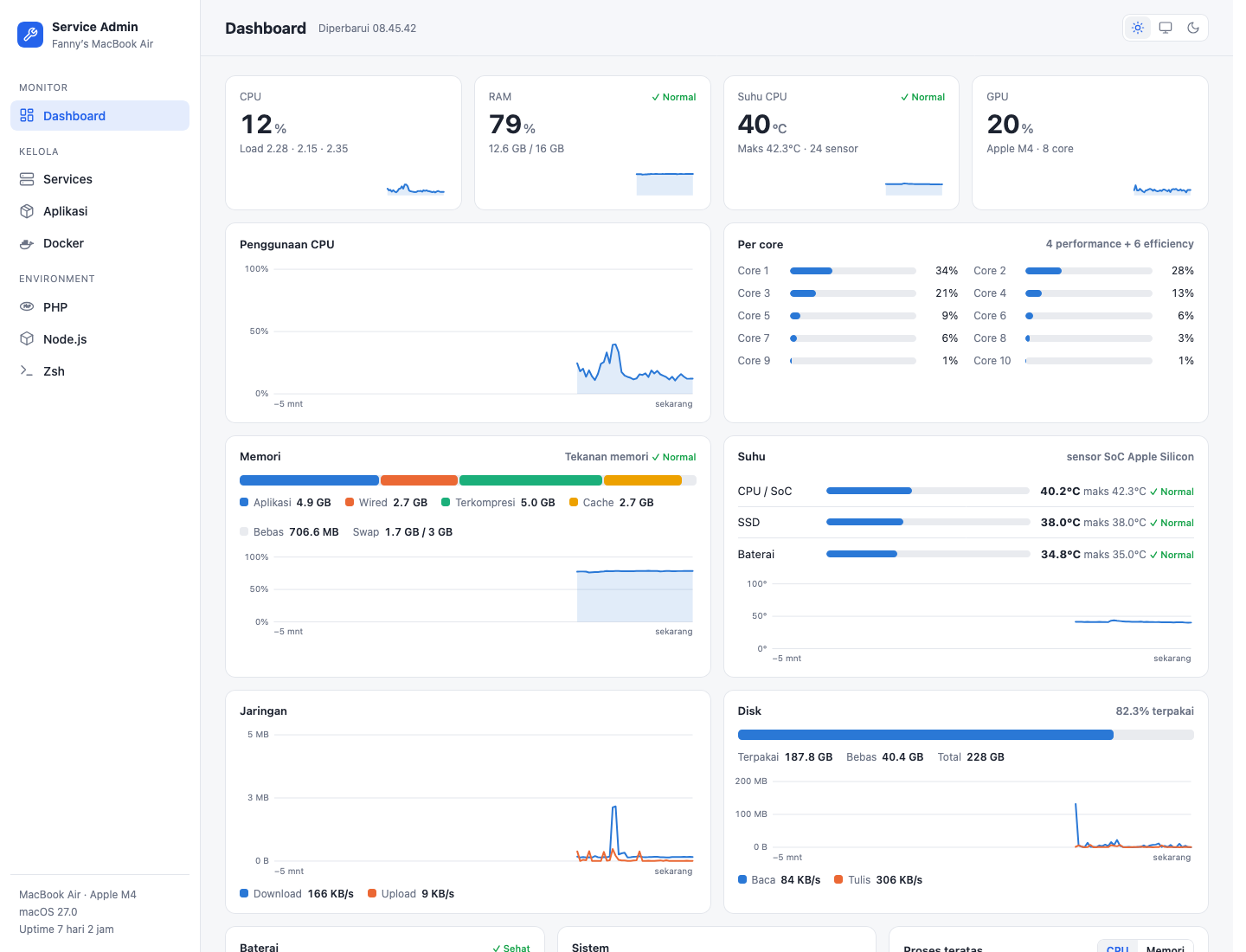
Mac Service Admin is a local web dashboard for managing a macOS development environment from one place: Homebrew services and packages, Docker, Laravel Herd, programming-language versions, configuration files, live system statistics, and a real terminal in the browser where Claude Code, vim, and htop work normally.
It has no dependencies at all — the backend is Python standard library and the frontend is vanilla JavaScript, so there is no pip install or npm install. It listens only on 127.0.0.1, keeps every asset (icons, xterm.js) in the repo, and is built for Apple Silicon.
Background
A typical Mac dev setup is scattered across brew services, OrbStack, Herd, nvm, pyenv, .zshrc edits, and Activity Monitor. Switching PHP versions
or checking why MySQL won’t start means remembering a different CLI for each. I wanted a single control panel — something like a hosting panel, but for my own laptop.
Goal
Build a fast, offline, zero-install dashboard that covers the day-to-day chores of a Mac developer, while being strict about security since it can run commands on the machine.
Features
- Dashboard: CPU total and per core (performance/efficiency), RAM and memory pressure, CPU/SSD/battery temperatures read from Apple Silicon sensors without
sudo, GPU, network, disk, battery health, top processes, and a 5-minute history chart. - Browser terminal: a real PTY-backed zsh with your
.zshrc, multiple tabs, resize, and sessions that survive page refreshes — plus a Processes tab for background jobs with live output. - Homebrew packages & services: start/stop/restart services, logs, 100 curated package recommendations, a popular-service catalog, per-service detail with ports and data folders, and a config editor with validation (
nginx -t,mysqld --validate-config,php-fpm -t, …). - Cloudflare Tunnel management: login, create/delete tunnels, route DNS, and edit ingress rules.
- Mac apps: list apps with source (App Store / Homebrew / manual), size, and last opened; open, quit, update, remove Gatekeeper quarantine, and inspect or reset privacy (TCC) permissions.
- Docker (OrbStack / Docker Desktop): live container stats, logs, console, a
docker runform with port-conflict checks, Compose up/down/edit, a compose builder with 16 templates, images, volumes, networks , and remote hosts over SSH. - Laravel Herd: sites, HTTPS, per-site PHP version, and a New Laravel app wizard (version, starter kit, auth, test framework, database, package manager).
- Languages: one page for PHP, Node.js, Python, Go, Rust, Java, Ruby, and more — pick defaults, install versions, and manage tools.
- Config files: editor with validation before save and automatic backups for shell rc files,
/etc/hosts(saved via the macOS admin password dialog), SSH, Git,php.ini, and every project’s.env. - Light / dark / system theme and a responsive sidebar.
Technologies
- Python 3.11+ standard library for the HTTP server, background jobs, PTY terminal, and system probes (IOKit sensors,
brew,docker,herd). - Vanilla JavaScript single-page UI with per-page modules and xterm.js for terminal rendering.
- A small Swift launcher app (
Service Admin.app) and a LaunchAgent so the server starts at login.
How to Run
git clone [email protected]:FannyDevz/mac-service-admin.git
cd mac-service-admin
./install.sh
The installer builds Service Admin.app in /Applications (openable from Spotlight) and a LaunchAgent that keeps the server running. Alternatively run it manually with python3 server.py and open http://127.0.0.1:8765.
Technical Decisions
Default language versions are switched through symlinks in ~/.service-admin/bin, added by a single marked block at the bottom of ~/.zshrc so it wins over other PATH injections — changing a version is just swapping a symlink, which even already-open terminals pick up. Long-running commands run as server-side jobs so their output survives refreshes.
Security is layered because the dashboard can execute commands: it binds to 127.0.0.1 only, checks the Host header to block DNS rebinding, requires a custom header on every POST to block CSRF, runs commands without a shell using validated input, only opens files from a fixed registry, masks secrets, and writes system files through the macOS admin dialog instead of cached sudo.
What I Learned
I learned how to build a real terminal over plain HTTP (PTY + long-polling), how to read Apple Silicon sensors without elevated privileges, and how much careful threat modelling a “local-only” tool still needs once it can run commands.
Notes
The UI and documentation are in Indonesian. Tested on macOS with Apple Silicon (M4); temperature sensors may be unavailable on Intel Macs or VMs.
Read the story behind this project: Mac Service Admin (in Indonesian).

Hey! I’m Fanny, the software engineer tending to this digital garden. You can read more about me, or subscribe by email.