

September 8, 2026
Axion AI.
FrontendA clean, modern SaaS landing page for a fictional AI work assistant, with a feature grid, pricing, and FAQ.
Description
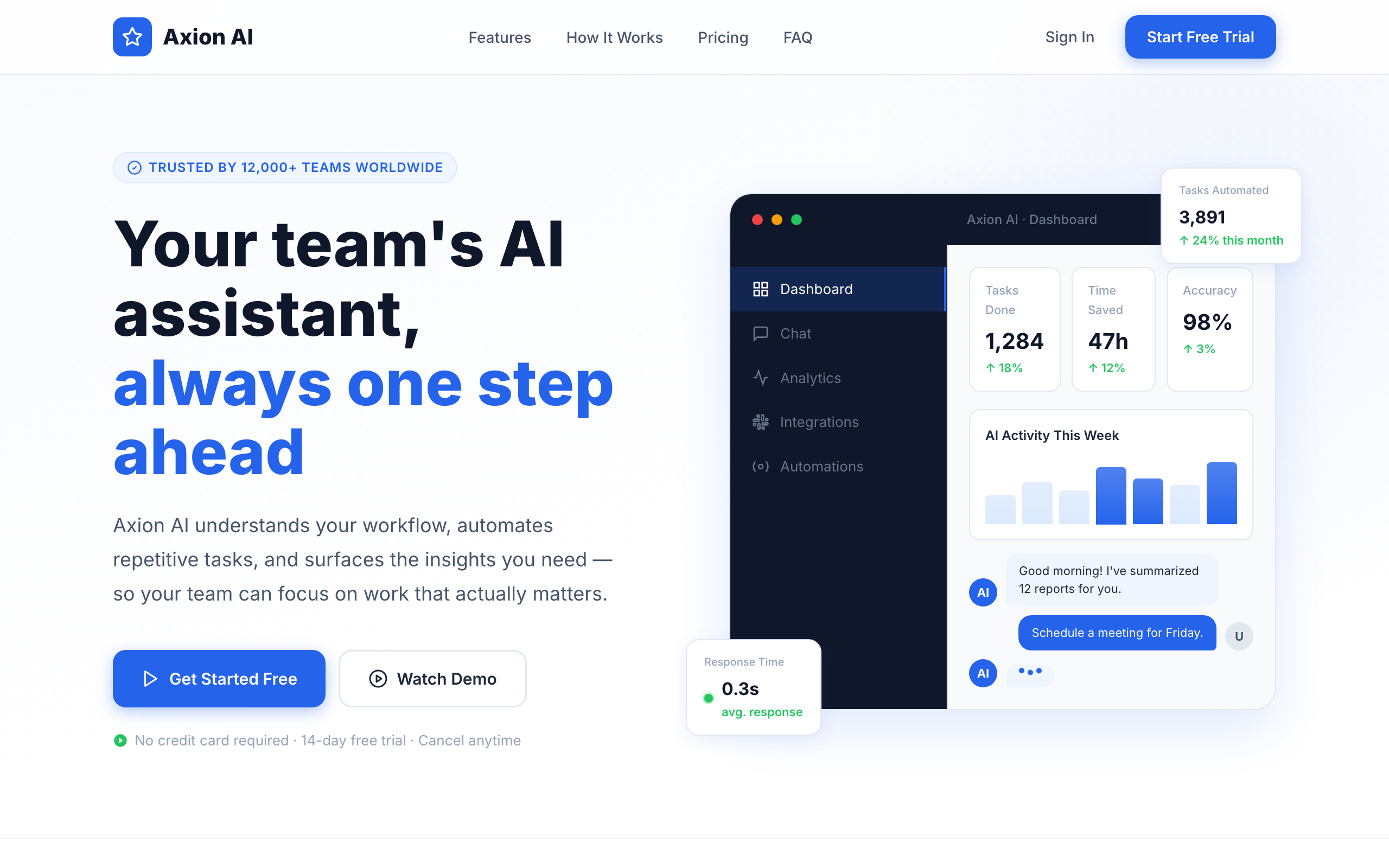
Axion AI is a clean, modern landing page for a fictional AI work-assistant SaaS. A light hero with a floating product-dashboard mockup (“Your team’s AI assistant, always one step ahead”) leads into a feature grid, how-it-works steps, testimonials, pricing, and an FAQ.
Background
This is an entry in my “One Day One Code ” series of small, focused daily builds. The goal was to practice the conventional modern SaaS landing-page playbook, a bright layout, a hero product mockup, and the usual feature-and-pricing flow, and to build the dashboard mockup entirely in HTML and CSS.
Goal
Ship a self-contained, polished SaaS landing page in a day that hits the expected marketing beats (hero, features, how it works, social proof, pricing, FAQ) and renders a convincing product-dashboard mockup without any images, all with no framework or build step.
Features
- Hero with headline, call-to-action buttons, and a dashboard-mockup card (tasks done, time saved, accuracy, live chat).
- Feature grid covering the product’s capabilities.
- How-it-works onboarding steps.
- Testimonials for social proof.
- Pricing plan tiers.
- Interactive FAQ accordion.
- Scroll-reveal animations, with the dashboard mockup built in pure HTML/CSS (including SVG charts, no images).
Technologies
- HTML (single self-contained file)
- Inline CSS, including a pure HTML/CSS dashboard mockup with SVG charts
- Vanilla JavaScript for the FAQ accordion and scroll reveals
- Inter via Google Fonts
How to Run
Clone the one-day-one-code repository and open 12. saas-ai-assistant/index.html directly in a browser; it is a self-contained single file. You can also serve the folder with a static server such as python3 -m http.server 8000. A live version is deployed at the demo URL above.
Technical Decisions
The page is one index.html with inline CSS and vanilla JavaScript, no framework and no build step. Instead of screenshots, the product-dashboard mockup is built entirely in HTML and CSS with inline SVG charts, so there are no image dependencies. JavaScript is limited to the FAQ accordion and scroll reveals, and Inter loads from a CDN with a system-font fallback.
What I Learned
Recreating a product-dashboard mockup in pure HTML and CSS, charts included, showed me how much UI you can fake convincingly without a single image asset. Assembling the full SaaS marketing flow in one sitting also gave me a clearer sense of the standard structure these pages follow and why.
Notes
Part of the shared one-day-one-code repository. A preview image is included with the project. This is a small daily build rather than a full production site.
Hey! I’m Fanny, the software engineer tending to this digital garden. You can read more about me, or subscribe by email.