

October 25, 2026
Slow Mail — Letters Carried by Animal Couriers.
Backend · FrontendA web app for letters that travel at their own pace: pick one of 10 animal couriers or regular post, and each letter crosses a map from your address to the recipient's, opening only when the courier lands.
Description
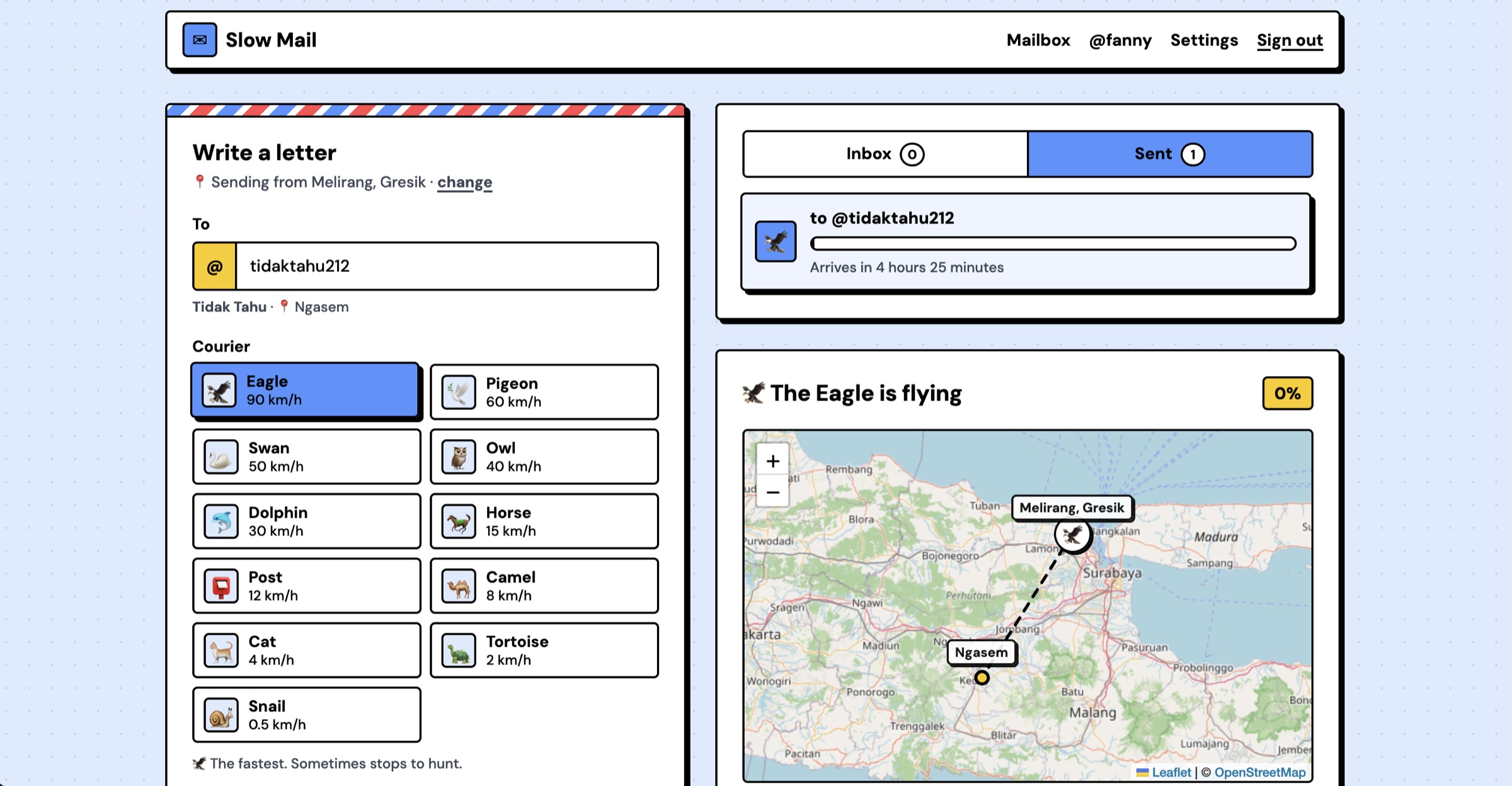
Slow Mail is a web app for letters that take their time. Every user has a profile with an @username and an address (a point on the map). A letter is sent to an @username and carried by a courier of your choice: an eagle, a pigeon, a swan, an owl, a dolphin, a horse, a camel, a cat, a turtle, a snail, or regular post. The courier sets off from the sender’s address to the recipient’s, and its position can be tracked on the map. The letter can only be opened once the courier “lands”.
Background
Chat apps made every message instant, and with that, a little weightless. I wanted to bring back the feeling of waiting for a letter: knowing it is on its way, watching it travel, and opening it only when it arrives.
Goal
Build a small, fun messaging app where travel time is the feature: the arrival time is real, honest and cannot be skipped, even by editing requests in the browser.
Features
- Profiles and addresses: an @username, a display name, and an address picked by detecting your location, searching for a place, clicking the map, or choosing a city.
- 10 animal couriers plus post: from an eagle at 90 km/h to a snail at 0.5 km/h. Arrival time is the distance divided by the courier’s speed, plus random events on the way (like rain) decided once when the letter is sent.
- Live tracking: each courier’s position is shown on a Leaflet map along its route, with a progress bar.
- Sealed until arrival: the letter body stays locked in the database until the courier lands.
- Replies and contacts: reply to a letter once it has arrived; recipient suggestions come only from people you have exchanged letters with.
- Notifications: new letters arrive in real time, and a toast or system notification appears when a courier lands while the app is open.
- Safety: block (both ways) and report, plus a public profile page that shows only a name and an area name, never coordinates.
- Admin: a super admin page (Voyager) with every user and letter, where letter bodies stay hidden until clicked.
Technologies
- Next.js 15 (App Router) and React 19 in plain JavaScript, with server actions
- Supabase (Postgres, Auth and Realtime) through
@supabase/ssr, with row-level security - Leaflet with OpenStreetMap tiles, and Nominatim for geocoding (MapTiler optional)
- Tests with
node:testand PGlite (Postgres in memory) for the trip logic and the RLS rules, run in CI - Deployed on Vercel, with functions in Tokyo next to the database
How to Run
Install Node.js 22 or later and create a Supabase project. Run npm install, push the migrations with the Supabase CLI, fill .env.local from .env.example, then npm run dev and open http://localhost:3000. In development, a 3,600x simulation speed lets you test a whole journey in seconds.
Technical Decisions
No courier position is ever stored. The position is computed from progress, (now - sentAt) / duration, and interpolated along the straight line between the two addresses. Letters are created only on the server with the server’s clock, so the arrival time and events cannot be set from the browser. The body column has no select grant: it only leaves the database through an open_message() function that checks ownership and that the arrival time has passed. Addresses are copied into the letter when it is sent, so a route doesn’t change if someone moves, and coordinates are rounded to about 1 km.
What I Learned
Making a delay trustworthy is mostly a database problem: the rule “you can’t read this yet” has to live in Postgres, not in the UI. With the database in Tokyo and around 150 ms per query from Indonesia, I also learned to verify the session JWT locally instead of calling the auth server, cache the session per request, and run independent queries in parallel.
Notes
The interface is in English, with a neo-brutalist design (2px black borders, hard shadows, flat colors). Notifications only fire while the app is open; email or Web Push for closed tabs is not built yet.

Hey! I’m Fanny, the software engineer tending to this digital garden. You can read more about me, or subscribe by email.